Running a business in the Philippines is hard enough. But between “How do I pay?” messages, fake payment screenshots, and manually checking notifications, getting paid can quickly become a bottleneck.
The manual verification method may work at first, but it doesn’t scale. It slows down sales, creates friction for customers, and leaves your business vulnerable to payment fraud.
Meanwhile, Filipino consumers are already used to paying online through GCash, Maya, and cards. In fact, digital payments now make up nearly 60% of retail transactions in the Philippines.
If you want to grow, you need a better way to accept payments.
This guide explains the payment links and payment gateways, how to set them up, and which option works best for your business, whether you have a website or not.
What Is a Payment Link? (And When Should You Use One?)
A payment link is a URL you generate and send to a customer that opens a secure, ready-to-pay checkout page with no website or coding required. The customer clicks, picks their payment method (GCash, Maya, card, etc.), and pays. You get a real-time notification. They get an automatic receipt.
Payment links are the fastest way for any small business to start accepting payments online. There's no technical setup, no monthly fee, and no minimum transaction volume. You can be up and running in under 10 minutes.
Payment links are ideal for:
- Social commerce sellers on Facebook, Instagram, TikTok Shop, or Viber
- Freelancers sending invoices to clients
- Small businesses testing a new product before building a website
- Anyone currently using manual payment verification who wants a safer, faster alternative
The biggest advantage of payment links over manual methods: they eliminate the fake screenshot problem entirely. Payment is confirmed directly by the payment network and you never have to verify a screenshot again.
What Is a Payment Gateway? (And When Do You Need One?)
A payment gateway is the infrastructure that connects your website or app to banks, e-wallets, and card networks, processing every transaction securely and in real time. It’s the umbrella system behind all online payments.
Unlike a payment link, connecting your website to a payment gateway requires integration. This is done via API (for custom-built websites and apps) or via Plugin (for e-commerce platforms like Shopify, WooCommerce, or Magento). Either way, when a customer checks out, the gateway handles the transaction invisibly in the background.
A payment gateway is the right choice if:
- You have an existing website or online store
- You're running on Shopify, WooCommerce, or Magento
- You want a fully branded, integrated checkout experience
- You're processing a high volume of transactions and need automation
In short, a payment link is a product you activate in minutes with no website needed. Integrating with a payment gateway (via API or Plugin) is your full e-commerce infrastructure for the long term. Most growing businesses use both.
How to Accept Payments Online Without a Website (Payment Links)
This is the fastest path to cashless payments. No website, no developer, no technical skills needed.
How it works:
- Sign up with a payment provider that offers payment links
- Enter the amount, currency, and a description (e.g., "Logo design deposit")
- Copy the generated link
- Share it via email, SMS, WhatsApp, social media, or anywhere else
- Your customer clicks, pays, and you get notified
That's it. The provider handles the checkout page, card processing, and receipts.
How to Accept Payments Online With a Website (Payment Gateway)
If you have a website or online store, integrate a payment gateway directly for a seamless, automated checkout experience.
Two ways to integrate a payment gateway:
1. Plugin / no-code (easiest) If your site runs on WordPress (WooCommerce), Shopify, Magento, or similar platforms, most payment providers offer a plugin you install and configure, no coding needed. Setup takes minutes.
2. API integration (more flexible) For custom-built websites, you integrate using the provider's API. This gives full control over the checkout design and experience, but requires developer work. Typical timeline: a few days to a week.
How a transaction works (simplified)
- The customer selects a payment method to use.
- The customer enters details of selected payment methods on your checkout page.
- The gateway encrypts and sends the data to the payment processor.
- The processor routes it to the payment method’s network, which checks with the customer's payment card network/e-wallet provider/bank.
- The card network/e-wallet provider/bank approves or declines – the response travels back the same way.
- The customer sees "Payment successful" (or an error).
- Funds settle into your account, usually within 1–3 business days.
The whole process takes a few seconds.
What to Look for in a Payment Gateway (and How to Evaluate Your Options)
Not all payment gateways are built the same and for a small Philippine business, the wrong choice can mean surprise monthly fees, limited local payment support, or a weeks-long onboarding process before you can accept a single peso.
Here's what actually matters when evaluating a payment gateway for a small business in the Philippines:
- No setup fee and monthly fees. If you're just scaling up, your transaction volume fluctuates. A gateway that charges only per transaction (not a flat monthly fee and a setup fee) keeps your costs proportional to your actual revenue. Look for providers with transparent, publicly listed rates.
- Local payment method coverage. Your customers pay with GCash, Maya, QR Ph, and local debit cards, not just international credit cards. A gateway that doesn't support local e-wallets and QR Ph will lose you sales, full stop. Verify coverage before signing up.
- Regulatory compliance. In the Philippines, your payment gateway should be regulated by the Bangko Sentral ng Pilipinas (BSP) and PCI-DSS certified. PCI-DSS Level 1 is the highest tier and it means the provider has passed independent audits of their payment security infrastructure. SOC 2 Type 2 certification is a further signal that a provider's data security controls are independently verified.
- Onboarding speed. Some gateways take weeks to activate a merchant account. For a small business, every day offline is lost revenue. Look for providers with a clear, documented verification timeline.
- Integration options that match your setup. If you're on Shopify or WooCommerce, plugin support matters more than API quality. If you're building something custom, you need solid API documentation and a sandbox environment to test in.
How Much Do Payment Gateways Charge in the Philippines?
Most Philippine payment gateways charge a per-transaction fee with no monthly subscription. Rates vary by payment method and provider. Here's a general benchmark from PayMongo:
- Credit/debit cards: 3.125% + Php 13.39
- E-wallets (GCash, Maya, Grabpay, etc.): 1.7-2.23% (depending on the e-wallet)
- QR Ph: 1.34%
- Direct Online Banking: 0.71% or Php 13.39
- BNPL (BillEase): 1.34% (you receive full payment upfront).
All rates above are VAT-exclusive. PayMongo's full rate card is available on the pricing page. There are no setup fees or monthly minimums.
One thing to watch for: some providers advertise low headline rates but charge separately for settlement speed, refunds, or certain payment methods. Always check the full fee schedule, not just the card rate.
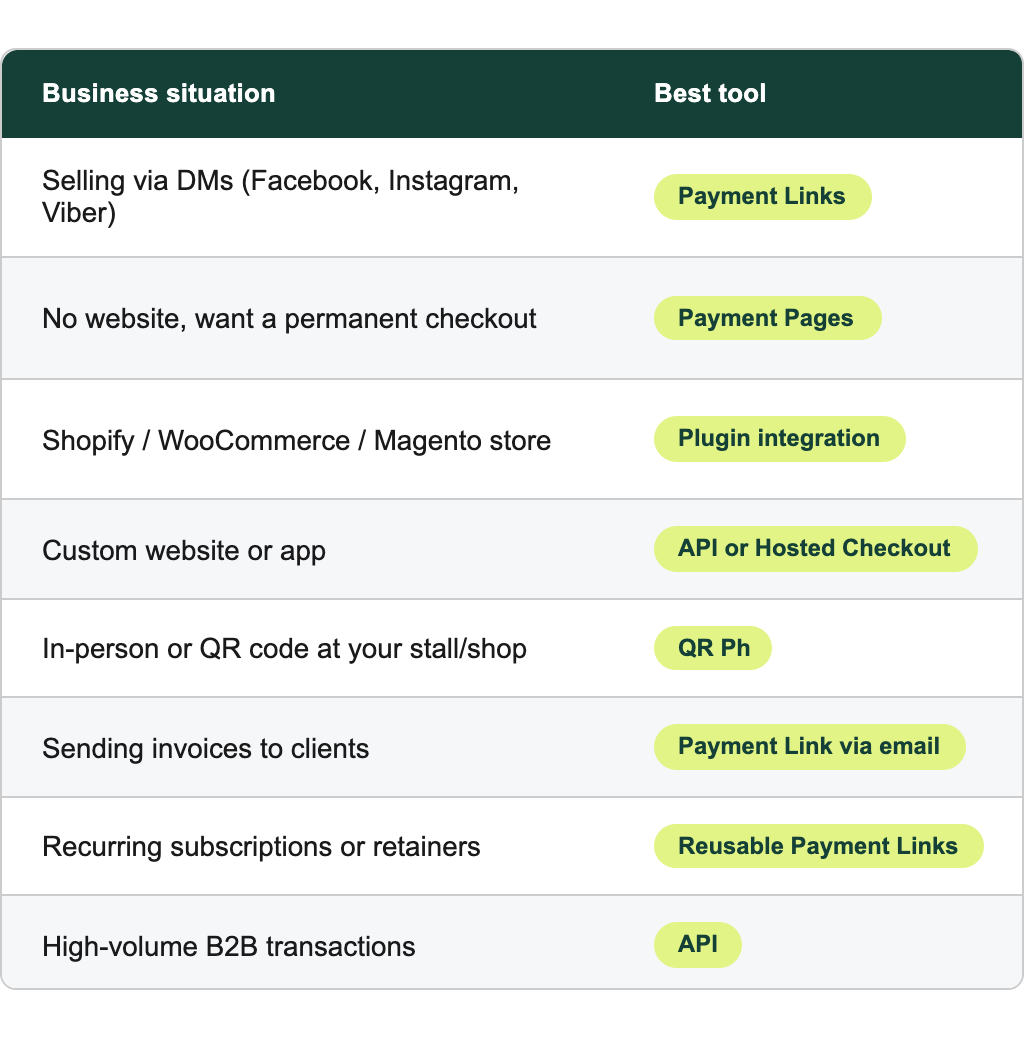
Where Can You Accept Payments? All Your Avenues
You can accept payments across every channel your customers use.
Frequently Asked Questions
What is the best payment gateway for small businesses in the Philippines?
The best payment gateway for a small Philippine business is one with no monthly fees, strong local payment method support (GCash, Maya, QR Ph, cards), BSP regulation, and fast merchant onboarding. PayMongo is one of the most widely used options for Philippine SMEs – it meets all of these criteria, charges zero monthly fees, supports 14+ local payment methods, and can have your account live within 5-7 business days.
How fast do I receive my money?
Under BSP Circular 1198, the standard settlement timeline is T+2, funds are settled within 2 business days from PayMongo's receipt of settlement from the payment partner. Actual settlement timeline may vary per merchant depending on the risk profile and assessment of the payment facilitator.
Can I accept payments on Facebook or Instagram without a website?
Yes. Create a payment link and share it directly in DMs, stories, or your bio. Customers click the link, pay via their preferred method, and you both receive confirmation instantly with no screenshots involved.
Is online payment safe for my customers?
Yes. Some platforms use 3D Secure (3DS) authentication for card transactions, real-time fraud detection, and enterprise-grade encryption. It's a security infrastructure used by large e-commerce platforms.