Send thousands of disbursements in minutes — not hours
Automate bulk disbursements through Instapay and Pesonet with a simple batch upload and programmable workflows.
Start automating your disbursements →
Manual payouts are holding your finance team back
Disbursing one transfer at a time
Finance teams handling payroll, incentives, or large disbursements often rely on manual bank portals that aren't designed for high-volume payouts. Hours are spent sending payouts one-by-one, and daily limits force teams to split across multiple transactions.
The cost of manual disbursements
Manual payout operations slow teams down and create real operational costs. As payout volume increases, companies often need additional staff just to manage disbursements.
Manual operations don't scale
Finance teams continue spending dozens of hours on repetitive payout work, payment cycles remain slow and operationally heavy, with high chances of errors and frequent reconciliation delays.
Bulk disbursement infrastructure built for scale
Send thousands of payouts in minutes
PayMongo provides API-driven and batch-based payout infrastructure built for scale. Finance teams can send hundreds or thousands of payouts at once instead of processing transfers individually.

Automate repetitive disbursement workflows
Set up recurring payouts and approvals once, instead of repeating the same manual process every week. PayMongo enables teams to automate the entire payout workflow, not just the transaction.
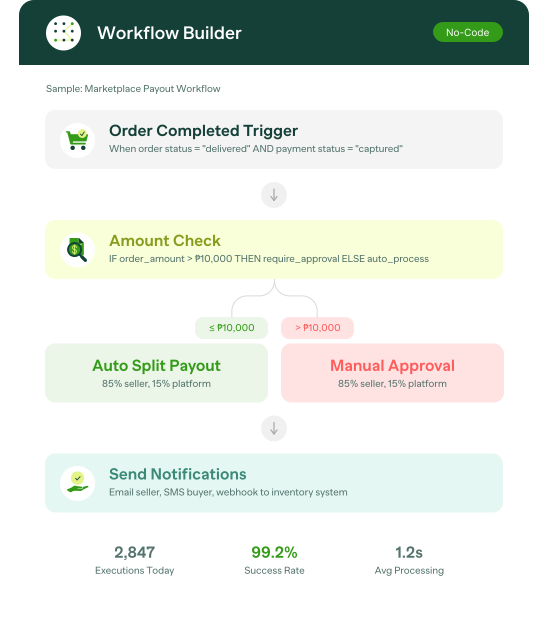
Move larger volumes without banking limits
Send larger payout volumes without splitting transactions across multiple banking tools. PayMongo infrastructure is designed for high-volume payout operations without typical daily or monthly outflow bottlenecks.

How it works
Simple, fast disbursements in three steps. Process up to 2,500 payouts in a single transaction.

Set up your account
Create an account and verify your business to access your Money Movement payments dashboard.

Start disbursing
Send transfers, run batch payouts, or send payments through QRPH. Upload a simple template with up to 2,500 rows per transaction.

Manage everything in one place
Track transactions, balances, and payment activity, and manage recipients from a single dashboard.